Every work order, under control.
Plan, assign and track every work order, from the office to the field, through to completion.
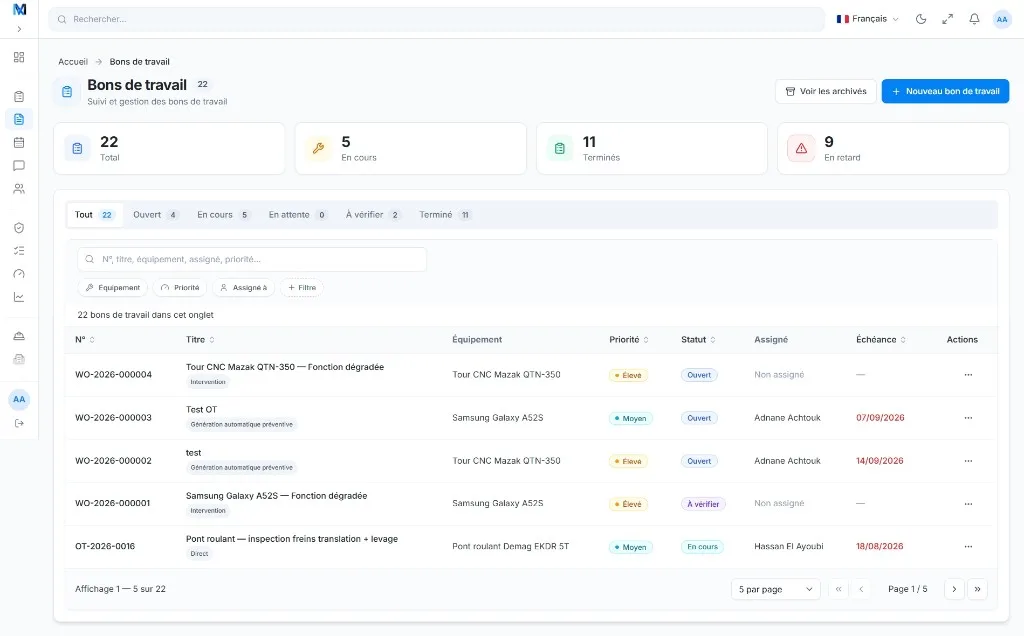
Centralized
All your work orders in one place
Real time
Office and field tracking
Traceable
A complete maintenance history
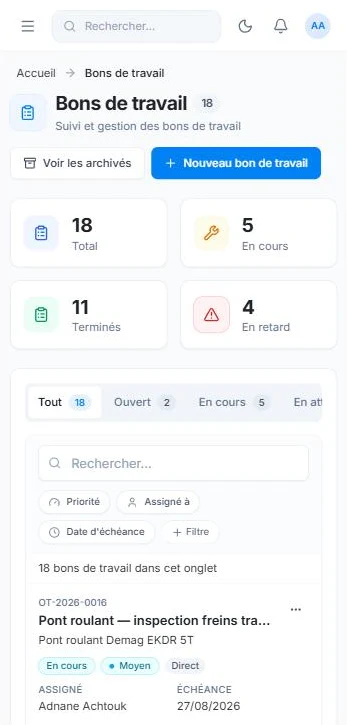
Mobile
Built for your field teams
A workflow built for the field
A simple, effective process from request to completion, for responsive, well-documented maintenance.
 01
01Report
Report a breakdown, an issue or a request from a phone, a QR code or the office.
 02
02Assign
Set the priority, schedule the job and assign the right person.
 03
03Carry out
The technician follows tasks, completes checklists and records actions on site.
 04
04Close
Validation, a completion report and updated history keep every intervention traceable.
Everything you need to manage work orders
Practical tools to save time, reduce breakdowns and track the performance of your equipment.
Priorities & statuses
Organize work orders by priority, type and status. See what is urgent, in progress or scheduled at a glance.
| WO | Equipment | Priority | Status | Assigned |
|---|---|---|---|---|
| OT-3482 | Pump P-001 | High | In progress | JD |
| OT-3484 | Compressor C-220 | Medium | Scheduled | ML |
| OT-3485 | Conveyor CV-003 | Low | Completed | SC |
| OT-3489 | Electrical cabinet | Medium | In progress | AP |
| OT-3493 | Forklift C-01 | Low | Pending | LB |
Field checklists
Tailored checklists for each intervention. A clear procedure that helps your team cover every task.
Parts & time
Track the parts used, time spent and costs to understand the resources behind every job.
Equipment history
Every intervention recorded on the equipment profile for complete traceability.
Validation & approval
Review and approve your technicians’ interventions before closing them.
Mobile first
A straightforward interface to view and update interventions in the field.
A clear view, from the office to the field
The full thread in under two minutes: reporting, approval, execution and close-out.
Anticipate instead of reacting
Turn intervention records into informed decisions to reduce downtime and improve equipment availability.
Designed for your teams
Tools for every role, whether on site or in the office.
Maintenance manager
Stay in control, plan work and organize your team’s resources.
Field technician
Get jobs done with a straightforward app and clear instructions.

Management / operations
Follow key indicators and the overall performance of your equipment.
FAQ / Work orders
Frequently asked questions about work orders
What is the difference between corrective and preventive work orders?
A corrective work order is created to fix a breakdown or malfunction. A preventive work order is planned ahead to carry out maintenance and avoid failures. MainteNeat lets you manage both types of work orders in one platform, with appropriate statuses and workflows.
How do I organize work order priorities and statuses?
Each work order has a priority, status, equipment item and assignee. Use the list filters to find urgent jobs, work in progress, work awaiting review and completed interventions.
Can technicians view and update work orders on mobile?
Yes. Technicians can view their work orders, follow checklists, add photos or comments and record interventions from their phones. An internet connection is needed to access up-to-date information.
How can I track costs and the parts used?
Technicians record time spent and parts consumed on the intervention. Stock movements remain linked to the work order so you can find the resources used and review maintenance costs.